Navigating the package drop-off process with ease

To help Amazon Flex delivery partners navigate the package drop-off process with ease and ensure you can get deliveries to customers, we provide several useful features in the Amazon Flex app. These features enable you to alert customers prior to your arrival, have the information needed to make the delivery, and get live assistance from our dedicated driver support team if required. Here are some of the key features that can help you save time and make successful deliveries at each location.
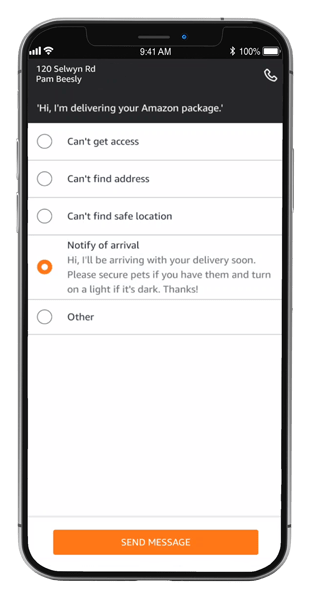
Notify of arrival
To improve your chances of a successful delivery and prioritize safety, you can notify customers that you’re on your way. Using the “Notify of arrival” feature, you can send a pre-written message to the next customer on your route, which lets them know you’ll be there soon, and asks them to secure pets and light a path to the delivery location. To send the message, tap the question mark icon (?) > “Text the customer” > “Notify of arrival.” This simple action can help ensure a smooth delivery before you even arrive.
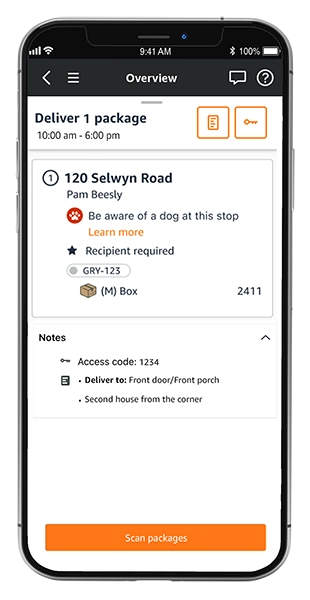
Delivery notes
Once you’re at a delivery location, review any notes about the delivery that have been left by the customer or Amazon. This may include details like where to park, location access codes, or a safe place to leave the package. This information is especially useful for apartment complexes and gated communities that may require special instructions. Delivery notes are available at the bottom of the screen for each delivery location, and you can expand them with a tap.
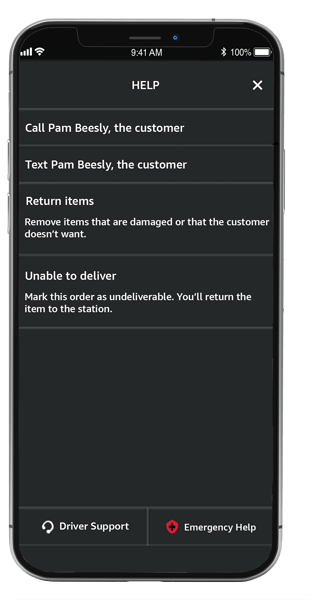
Contact customer
If you’ve read the delivery notes and need more information to deliver the package, or you arrive at a business that appears to be closed, reach out to the customer through the “Contact customer” feature. Once you select the text or call option, you’ll be connected to the customer in a way that keeps your phone number private. There are several pre-written text messages and a custom option available, so you can quickly make requests and get the information you need to successfully make the delivery. This feature is available through the question mark icon.
Driver support
Driver support is another helpful resource, which provides live assistance through your choice of a phone call or in-app chat. The driver support team can attempt to contact a customer on your behalf if you’re unable to reach them and advise you on how to proceed.
For more information on each feature, visit the “Making deliveries” section in the Learning Portal in the Amazon Flex app.
Related Blog Posts

Amazon Now offers delivery partners more flexible ways to earn

Learn from delivery partners about how they deliver a high-quality customer experience
Keeping you safe during severe weather

Meet a delivery partner who saved a home from a fire while delivering

Thank My Driver is back!

Amazon Flex Store offers items to help keep you safe when delivering
Download the Amazon Flex app
Create an account to set your schedule, see your earnings upfront, and start delivering with confidence.