Navigating to and from delivery stops with ease

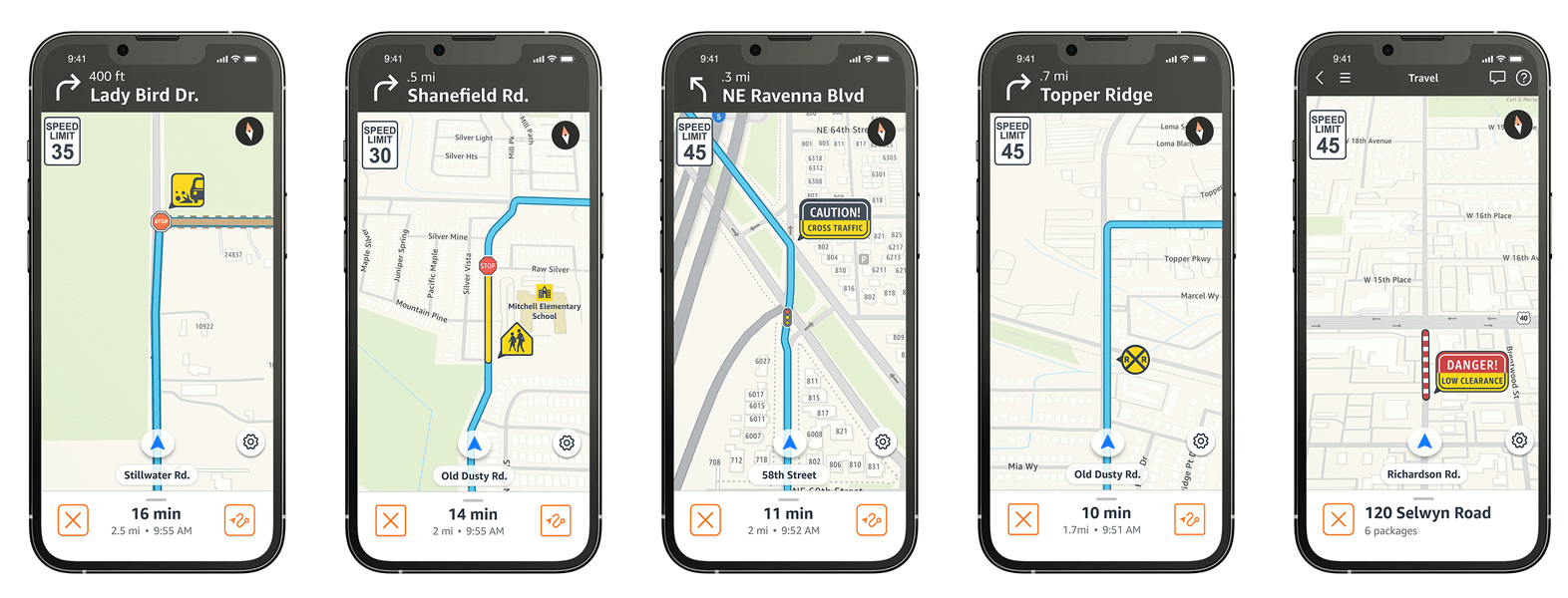
Amazon Flex maps and navigation are developed specifically for the needs of Amazon Flex delivery partners, and include guided navigation, real-time traffic and road closures, safety cues, parking suggestions, offline maps, and more. Here are some of the key navigation features that can help you travel while delivering packages to customers.
Real-time road information and map safety cues
It’s important that you have timely, relevant, and easily understandable directions so you can focus on getting to each location safely. In Amazon Flex maps, we show real-time road information and include icons for upcoming stop signs and traffic lights, so you are aware of upcoming intersections. Amazon Flex maps also include warnings for closed roads and safety cues for low bridges, rail road crossings, and cross traffic warnings. We also include a “heads-up” notification when you are approaching a school zone, or a warning that you will encounter an unpaved road. Note that Amazon Flex maps may not capture all relevant updates and you may find that actual conditions differ from the map results. Please remain vigilant and exercise your best judgment.
Parking suggestions
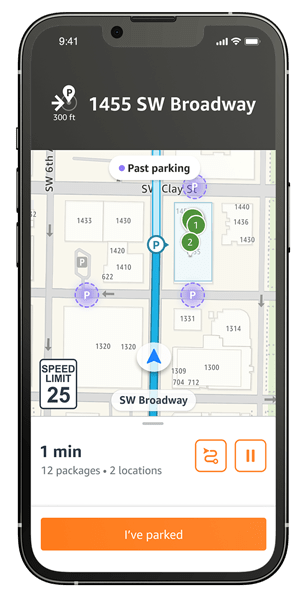
In order to help you locate parking and save time at delivery stops, parking recommendations will appear on the map view when you’re approaching a delivery stop. Look for “P” icons on the map near the delivery stop to navigate to parking options, if available. These suggested parking locations are based on where other delivery drivers have parked.
Offline maps
In case mobile coverage is limited while you’re on the road, you can download Amazon Flex maps to your phone before each block. To download a map for offline use, visit the settings screen in the Amazon Flex app, and scroll through the region list to find and select your area's map. You can also select to automatically download offline maps whenever you are connected to Wi-Fi.
You can provide detailed feedback about the Amazon Flex app navigation experience by clicking the gear icon in the upper right-hand corner of the map view and then “Report a problem.” Once we’ve resolved the issue or have an update to share, we’ll send you a message in the “Updates” section. For more information on each feature, visit the “Making deliveries” section in the Learning Portal in the Amazon Flex app.
Related Blog Posts

Improving your experience in the updated Amazon Flex app

Meet two delivery partners balancing motherhood and flexibility

Enjoy more earning opportunities with shorter Sub Same-Day delivery options
Amazon is helping keep delivery partners safe when delivering around pets

Making multi-location delivery stops easier to navigate

Helping delivery partners with fuel expenses
Download the Amazon Flex app
Create an account to set your schedule, see your earnings upfront, and start delivering with confidence.